Chronicle User Guide
HOWTO CHRONICLE
This guide is written for first-time and non-technical users. It explains how to create, publish, protect, connect, and contextualize memoirs in Chronicle without guesswork.
Guide Navigation
Tip: start with “Visibility and Sharing Basics” and “How Story Graph Matching Works.”
What Chronicle Is
Chronicle is for real-life memories. Every memory is tied to a date, a place, and your own account of what happened.
Chronicle is made for non-fiction personal history. It is not a social feed and it is not designed for viral content.
A few clear, factual memories are usually better than many vague ones.
If you are new, think of Chronicle as a private record of your life that can later connect into a timeline and story graph.
Core Building Blocks
These concepts appear throughout the product and understanding them early makes everything easier.
Naming note: in the UI we call these Memory Chapters for readability, while some technical APIs and URLs still use the internal term storyline.
| Category | Description | Why it matters |
|---|---|---|
| Memory | One entry with title, body, date, location, and tags | Atomic unit of personal history |
| Story | A published memory | Visible according to selected visibility rules |
| Draft | Unpublished memory | Can be refined before publication |
| Memory Chapter | Multiple related memoirs connected over time | Narrative sequence, not one isolated memory |
| Story Graph | Story-to-story links by event, location, and subject | Contextual discovery between related memories |
| Chronology | Story links to broader historical events | Places personal memory into historical context |
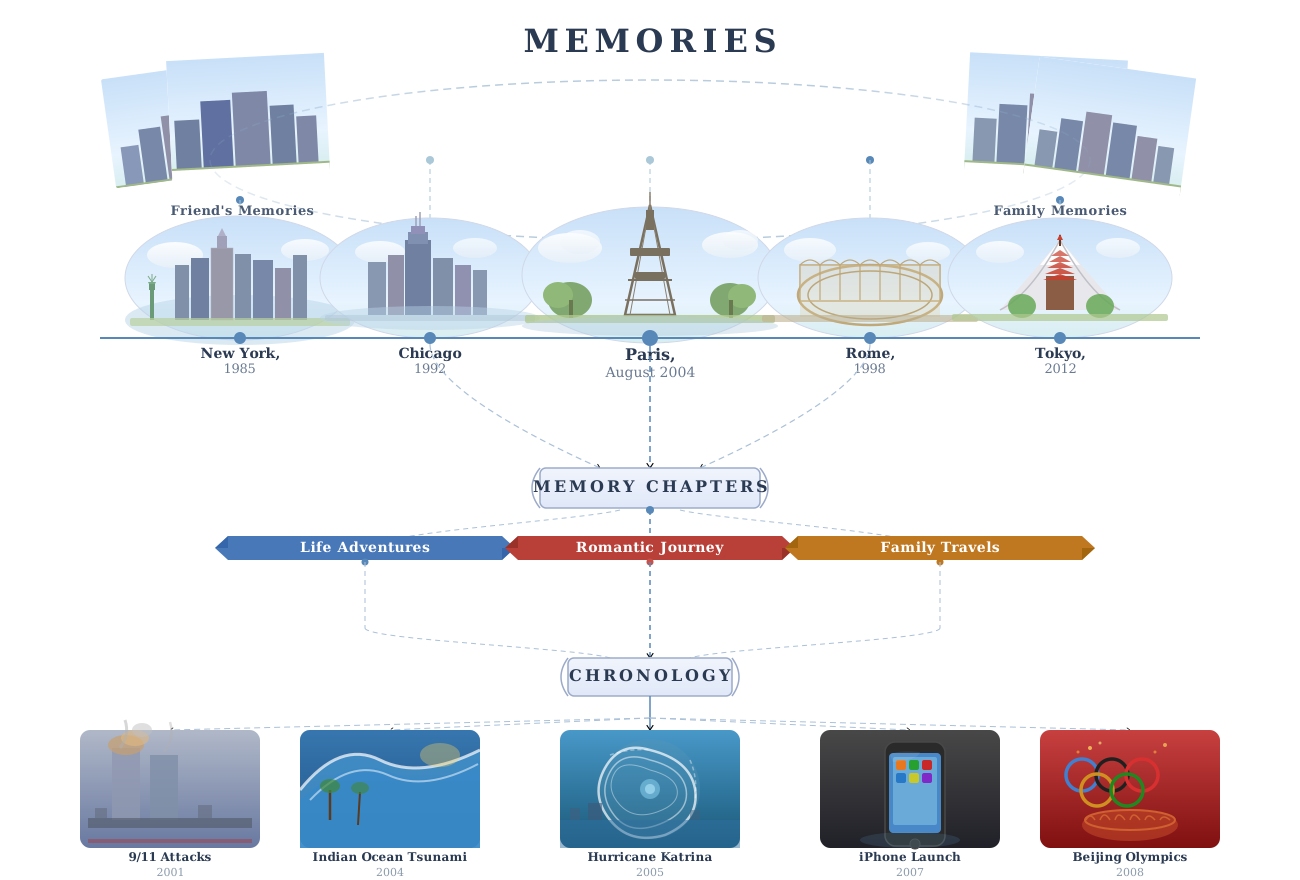
Memory -> Chapter -> Chronology (Visual Model)
This map shows how Chronicle builds connections from lived experience: memories connect into chapters, and chapters connect into historical context.
Read the flow from top to bottom. Individual memories appear first, then group into chapter ribbons, then connect to chronology events.
Connections are built from shared time, place, and subject signals, so related memories naturally form stronger narrative paths.
Memory Chapters help turn separate entries into a coherent arc, while Chronology helps place those arcs inside wider historical moments.
| Category | Description | Why it matters |
|---|---|---|
| Memory -> Chapter | Ordered grouping for narrative sequence | Helps readers follow a connected memoir arc |
| Memory -> Chronology | Event-level contextual link | Places personal moments into wider historical context |
| Chapter -> Primary Event | Optional single contextual anchor | Gives each chapter a clear historical center of gravity |
Visibility and Sharing Basics
Visibility decides who can read a memory after you publish it.
Restricted memories are permission-based. People cannot see them unless you add and save sharing permissions.
Drafts stay private until you publish.
Simple rule: choose the most private option that still fits who you want to share with.
| Category | Description | Why it matters |
|---|---|---|
| Private | Only the author can read the memory | Personal reflection or sensitive detail |
| Restricted | Author plus explicitly approved users/lists | Family, trusted collaborators, selected readers |
| Public | Broadly readable on public surfaces | Open testimony and discoverable memoir |
Memory Chapter Visibility and Access Rules
Memory Chapters help organize narrative flow. Visibility is applied in a predictable way so readers see the right chapter context without confusion.
Think of Memory Chapters as a reading guide: they point to related memories, then each memory decides who can open it.
That is why chapter totals can differ from what one viewer sees in detail.
If someone reports a missing memory in a chapter, first check that memory’s visibility and share settings.
- Authors can see the chapter context and all of their own entries.
- Shared viewers see public chapter pages and only memories shared with them.
- General viewers see public chapter pages with public memories only.
- Inside one chapter, each memory can still differ by visibility.
| Category | Description | Why it matters |
|---|---|---|
| Chapter page access | A Memory Chapter page must be public or owned by the viewer | If the chapter page is hidden, readers will not see that chapter grouping |
| Memory access inside chapter | Each memory is checked separately (public/restricted/private) | Viewer only sees entries they can read |
| Public memory chapter + private memory | Chapter can be visible | Private memory still hidden to non-author viewers |
| Private/restricted memory chapter | Container shown to author only | Other viewers do not see chapter grouping at all |
Encryption and Passphrase
Chronicle separates sign-in from memory unlock so protected memories remain stable and accessible over time.
Protected-memory text is unlocked in your session after your key is available on that device.
After passphrase updates, open a few older protected memories to confirm everything still unlocks correctly.
Keep your recovery phrase offline so you can regain access later if needed.
- Private and restricted memory text is encrypted.
- Public story text can still be encrypted while stored on the server.
- Titles, dates, locations, and tags stay searchable so navigation still works.
- Your encryption passphrase is separate from login by default.
- Use your passphrase (or recovery phrase) to unlock protected memories on each device.
| Category | Description | Why it matters |
|---|---|---|
| Login password / OAuth sign-in | Confirms account identity and starts your session | Authentication only; does not directly decrypt private memory text |
| Encryption passphrase | Unwraps your encrypted private key on this device | Required to decrypt private/restricted memory content |
| Recovery phrase | Backup wrapper for the same private key | Lets you regain access if passphrase/device access is lost |
| Public-at-rest encryption | Server-side encryption for public memory storage | Protects DB dumps while preserving public readability via API |
Email vs OAuth: Same Encryption Workflow
Email and OAuth sign-in use the same Chronicle memory-unlock flow. Only the sign-in method changes.
For Email users: login password authenticates your account. Encryption passphrase decrypts your private/restricted memory content.
For OAuth users: provider sign-in authenticates your account. Chronicle passphrase still controls protected-memory decryption.
For both: Recovery phrase is the backup route to restore passphrase access without re-encrypting all memory content from scratch.
Simple mental model: sign in to enter Chronicle, unlock to read protected memories.
| Category | Description | Why it matters |
|---|---|---|
| Email login | Sign in with email + password, then unlock encryption key | You may choose to align passphrase with login password for convenience |
| OAuth login | Sign in with OAuth provider, then unlock encryption key | Same passphrase + recovery controls as email users |
| New device | Session starts, then key unlock is checked | Use passphrase or recovery phrase path to restore unlock |
| Password resets | Account password can change independently | Encryption passphrase remains separate unless you intentionally sync |
Edit Window, Immutability, and Anchoring
After publishing, you have 24 hours to refine your memory. After that, content stays fixed so timelines and connections remain trustworthy.
This lock keeps published memories reliable as references over time.
If you still expect major rewrites, keep it as a draft and publish when the core facts are ready to stand after 24 hours.
| Category | Description | Why it matters |
|---|---|---|
| Publish + first 24h | Author can edit content and metadata | Fix typos, clarify context, refine tags |
| After 24h | Content becomes immutable by default | Protects long-term integrity |
| Anchoring timing | Can be delayed to end of 24h grace period | Prevents accidental lock-in too early |
How Story Graph Matching Works
Connections are intentional. Chronicle combines date, place, tags, and title cues to suggest related memories.
Chronicle prioritizes tags first. Accurate tags usually produce stronger suggestions.
Title similarity is a backup signal, not the main one.
In practice, better tags and consistent location names improve graph quality a lot.
- Event link: same date and same location.
- Location link: same location context.
- Subject link: overlapping topics, mostly based on shared tags/categories.
- For different authors, manual connections are request-based: sender requests, receiver approves.
- If both memories are yours, Chronicle can approve that connection immediately.
- You can only request links between memories both sides can actually open.
- Chronicle blocks duplicate or loop-back links that do not add useful context.
- Subject-only manual links need stronger context first (usually an event link).
How to Write for Better Connections
If your goal is to connect memories by subject or theme, writing quality and metadata quality matter equally.
Avoid using the same broad tag for every story (for example, tagging everything as just “life”). This creates noisy, low-quality matches.
If two memories should be linked by theme, make sure they share at least one specific tag.
- Use specific dates (or verify auto-filled date is accurate).
- Use consistent location naming (same city format across related stories).
- Use precise tags instead of broad placeholders.
- Keep title descriptive and factual.
- Prefer one memory per meaningful event moment.
Create Memory: Photo Upload Rules
Photo support is intentionally constrained for performance and consistent rendering.
- EXIF orientation is normalized during processing.
- Images are re-encoded and optimized after upload.
| Category | Description | Why it matters |
|---|---|---|
| Photos per memory | One photo per memory | Keeps memory cards and exports predictable |
| Allowed formats | JPEG, PNG, WEBP | Other formats are rejected |
| Max upload size | 5 MB | Uploads above limit are blocked |
| Resize behavior | Longest side capped at 1600 px | Large images are normalized for speed/storage |
Location and Map View Rules
Map view is designed for historical context and discovery across places.
Map view is for context and discovery, not exact address tracking.
If a story is missing from the map, first check location validity and visibility permissions.
- If you type a landmark, Chronicle may convert it to a city-level location for consistency.
- Stories appear where location resolution is valid.
- Consistent location naming improves cluster quality in map and graph.
Search and Filters: How to Find Memories Fast
Search is designed to work best with filters. Start broad, then narrow step-by-step until the result set is small and relevant.
A reliable pattern: set date range first, then add one text filter, then add tags only if needed.
If you get zero results, clear one filter at a time instead of clearing everything.
Timeline view follows the same filter inputs. Use list or grid when you want to scan many results quickly.
- Use Search Content for keywords from title/body text.
- Use Location for city or place names (keep naming consistent).
- Use Start/End Date to limit noisy results first.
- Use Subject Tags when you know the topic cluster.
- Use Visibility Scope to avoid mixing public/shared/private contexts.
- Click Apply Filters after changing fields; changes are not applied until you do.
Building a Memory Chapter Across Multiple Memoirs
A strong memory chapter is a curated sequence, not a pile of loosely related memories.
A good memory chapter usually has three parts: setup, turning point, and consequence.
Even if some entries are private and others are shared, you can still keep a coherent chapter.
- Start with the anchor memory that defines the central event.
- Add before/after memories around the same people/themes.
- Reuse consistent tags across the sequence.
- Keep chronological order accurate.
- Review and confirm suggested links.
Chronology: Purpose, User Value, and Internal Logic
Chronology connects personal memories to broader events to preserve context across time.
Chronology helps explain why a personal moment mattered, not only when it happened.
Internal high-level logic: chronology matching uses date overlap, region/location relevance, topic hints, and moderation state.
Chronology adds context around your memory. It does not rewrite your text or change your meaning.
Suggesting New Chronology Events
If the relevant historical event does not exist, users can submit a proposal for moderation.
Strong submissions are specific and clearly scoped. Vague submissions are slower to review and more likely to be rejected.
Once approved, events can be used for chronology links.
- Provide clear event title and date window.
- Provide region/context description.
- Explain why the event is historically significant.
- Submit and track moderation outcome.
Best Practices for High-Quality Memoirs
Quality memoirs are clear, specific, and anchored. They read better and connect better.
- Write concrete moments, not abstract summaries.
- Name real context (date, place, people, outcome).
- Use tags that clearly describe the subject.
- Use one memory per meaningful unit of experience.
- Publish when you are comfortable that the core facts should stay fixed after 24 hours.
- Use drafts for refinement. Quick Capture draft cap is currently 10 per user.
Common Mistakes and How to Avoid Them
Most connection issues come from metadata quality, not system failure.
| Category | Description | Why it matters |
|---|---|---|
| Issue | Why it happens | Fix |
| No graph links | Generic tags or inconsistent location naming | Normalize tags and city naming |
| Weak chronology relevance | Vague date range or region mismatch | Tighten event date/location context |
| Shared reader cannot see story | Permission grant not saved correctly | Recheck restricted grants |
| Locked encrypted memory | Passphrase/recovery mismatch | Use profile recovery flow |
Quick FAQ
Short answers for frequent questions from first-time users.
- Can I keep memories private forever? Yes, with private visibility.
- Can I share with only specific people? Yes, use restricted visibility and grants.
- Why did two stories not connect? Usually tag/date/location mismatch.
- Can chronology be user-extended? Yes, via event submission and moderation.
- Is everything public if I publish one story? No. Visibility is per story.